by cameron | Dec 3, 2013 | Lifehacks
Do you remember the days when things were limited? When you might buy one new album of music every couple of months? When you had to buy photo negatives by the roll and be careful what you used them on? When there were only two channels of television? When there was one newspaper to read? When you had to go to the library to get your hands on a new book to read?
Today we are inundated with media options. Some people say it’s too much. Some people say we are oversaturated. Some people say all of this content is making us less appreciative.

Photo by Andrew Saltmarsh
I’m starting to agree. I remember appreciating music much more (or at least it seemed that way) when I’d buy a new album rarely and then listen to it over and over and over, becoming familiar with every nuance, every note. Today I still love those albums. Putting them on gives me the feels, releasing an oxytocin burst of the warms and fuzzies. Is it somehow due, at least in part, to their familiarity?
Perhaps less *is* more.
Over the last decade I’ve become something of a miner bird, foraging on bits and pieces of media all day long – a song here, a song there, this blog, that blog, 10,000 Twitter feeds, 1,000 Facebook feeds, 100 books on my iPad, watching YouTube clip after YouTube clip, TV torrents by the bucketload – from dawn until midnight. And it’s not limited to the media I consume, it also extends to the media I produce. I might take 10 photos a day and several videos. I tweet. I Facebook. I blog. It’s too easy to produce gallons of crap.
Less is more.
What if I limited myself?
I limit myself in other areas of life – eg I only eat ice cream (and sugar free at that) on weekends – what if I limited myself digitally as well?
What if I limited myself to taking one photo every day? If I’m only allowing myself one photo, it had better be the best photo I can take.
What if I limited myself to listening to one album of music every week? No more shuffling. One album. I’d have to listen to it over and over until I knew the grooves inside and out.
What if I limited myself to writing one Tweet / Facebook post per day and writing one blog post per week? I better make sure they are good.
What if I limited myself to one episode of TV per day? One YouTube clip?
What if I reduced my Twitter feed to ten people? The same with Facebook. They better be the best feeds I can find.
What if I reduced the feeds in Flipboard and Zite to only one or two? Would it make me choose what I read more carefully?
I’m going to treat my media consumption and production with the Polaroid philosophy. I’m going to force myself to set artificial limits, a media diet. Because I really do believe that less is more.
by cameron | Dec 3, 2013 | Australian politics, indigenous affairs, Video
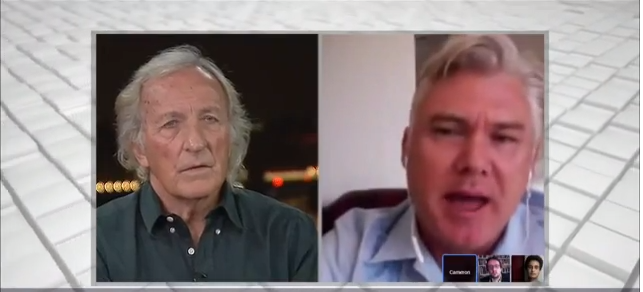
I had the opportunity this morning (5:30am my time!) to participate in a live discussion on Al Jazeera with John Pilger, the famous Australian investigative journalist, supporter of Julian Assange, and documentarian, about his new documentary “Utopia”, which looks at the current state of Australia’s treatment of our indigenous population. Although I barely got to speak to him (my one question comes in at the 30 minute mark), it was terrific to listen to him explain what he believes is the role of journalism and, in particular, investigative journalism. I want to be him when I grow up.
Utopia Trailer:
by cameron | Dec 2, 2013 | Evernote
Last week I attended the Brisbane Evernote User Group (BEUG for short) and we were very fortunate to have Troy Malone from Evernote HQ (General Manager, Asia Pacific) join us over Skype for a chat about he uses their product in his daily life. How cool is that? It was pretty late his time too (midnight I think), so you have to hand it to Evernoters for evganelising.
I asked Troy what tool he recommends for clipping content from iOS apps into Evernote and he introduced me to the Lightly app made by Ignition Soft, the same company that makes Everclip, one of my other favourite iOS apps. So that was a win. (FWIW – Lightly is great for copying certain lines of text from a page you’re reading on your browser into Evernote, but I prefer Everclip for copying content out of other apps, like iBooks, etc).
Afterwards, Troy said the only thing he hasn’t figured out yet is how to get Facebook posts into Evernote. I said “I can do that!”
It wasn’t easy, but I nutted it out a few weeks ago when my wife, Chrissy, announced she was pregnant on Facebook. I thought it would be nice to save that for the baby book – and of course, the natural place for it is in Evernote.
So if anyone else is trying to work out how to clip a Facebook post (and its comments) into Evernote, here’s how I do it.
How To Clip A Facebook Post Into Evernote
STEP 1.
Open up the post you want to save. Facebook will open it in “Theater mode” – which is nice to look at, but annoying to try to clip into Evernote. Select the URL in the address bar and copy it.

Step 2.
Post that bad boy into a new tab. The resulting page should look like this:

Step 3.
Expand all of the comments (if you want them to end up in Evernote).

Step 4.
Cick your good ol’ Evernote Web Clipper, select “Full Page” and “Save”.

Step 5.
Hey presto! Once you have synchronized Evernote, you’re post will look just like it did in Facebook!

I hope that helps some of you to get more out of Evernote!
by Cameron Reilly
by cameron | Nov 29, 2013 | Uncategorized

/ on Instagram http://ift.tt/1bu7hzZ
via Tumblr http://cameronreilly.tumblr.com/post/68452435006
by cameron | Nov 27, 2013 | Uncategorized

Last Friday night we launched Sunday Assembly Brisbane – a godless congregation or atheist church. #sundayassembly / on Instagram http://ift.tt/IrHPOC
via Tumblr http://cameronreilly.tumblr.com/post/68221694979