by cameron | Sep 23, 2009 | technology
I just watched the Microsoft "Courier" Tablet video on Gizmodo (see the bottom of this post if you haven’t seen it already) and it really looks amazing… until you realize that Microsoft has been making amazing looking futuristic videos for a decade and what have they delivered? Nada.
I was working at Microsoft back in 2000 when they came out with the infamous "Steve Masters" video. Check it out below.
Pretty impressive, huh? That was NINE YEARS AGO. And what does Microsoft have in the market that looks ANYTHING like that today?
You tell me.
So I’m sorry Microsoft. Deliver something cool, deliver on your vision just ONCE (outside of XBOX 360 of course, that *is* cool) and I might believe your futuristic videos again. But until then, why not be more like Apple and actually invest your energies into actually MAKING cool products instead of videos telling us how cool your products will be one day?
Here’s the Courier Tablet video if you haven’t already seen it:
by cameron | Sep 10, 2009 | technology, transhumanism
[youtube=http://www.youtube.com/watch?v=qdlLVMGXSQk&w=425&h=344]
According to InventorsSpot.com – it’s called “A Twinkle in the Eye” and these lenses have been fabricated with an LED, a small radio chip and an antenna.The unit is powered wirelessly by the RF electrical signal and represents the start of research that could eventually lead to screens mounted onto contact lenses inside your eyes.

This reminds me of Vernor Vinge’s novel, RAINBOWS END which was set about 20 years into the future when everyone wore contact lenses that had the net and all sorts of augmented reality overlays. I did an interview with Vinge about it which you can listen to here. Sign me up for this shit NOW.

This reminds me of Vernor Vinge’s novel, RAINBOWS END which was set about 20 years into the future when everyone wore contact lenses that had the net and all sorts of augmented reality overlays. I did an interview with Vinge about it which you can listen to here. Sign me up for this shit NOW.
by cameron | Jul 31, 2009 | technology
I’ve been using Google Reader as my default RSS reader for a few years and, like all Google server products, I love it. However I also like to use a clients for some of my services, such as mail and calendar, because they allow me a deeper level of customization of the user experience.
A few months ago I went looking for a Mac RSS client that would act as a front-end to Google Reader but I couldn’t find one. I ended up moving to NetNewsWire instead as an interim measure, exporting my Google Reader OPML. Unfortunately, though, the NNW iPhone client keeps crashing on me, so I had to use Google Reader on the iPhone – not a great experience either, because everytime I leave Reader to view a full post, then return to Reader, Safari refreshes all the feeds takes me back to page one, even if I’m on page ten!
Anyway, Newsgator CTO & Founder Greg Reinacker announced via email today that they are releasing new versions of all of their products (some today, some, like the iPhone client, soon), that will use Google Reader as the back-end. Great news! I’ve already upgraded my NetNewsWire Mac client. Thanks Greg!
Download the new versions here.
by cameron | Jul 22, 2009 | iPhone
UPDATE DECEMBER 2012
These days I’m using SOCIAL CHESS on the iPad to play turn-based games. I highly recommend it however you can’t export your games to .pgn, which is a shame for those of us that like to study our losses. 🙂

I have also been checking out CHESS PRO. It seems like a great training app for people who are new to chess. It takes a slightly different approach to other training apps.
How does it work? It’s really simple: you just play! The coach shows you the moves a Grandmaster would pick. Not just one move, but the 4 best moves.
Comes in a free version as well as a $9.99 version.
UPDATE (September 2012)
This post gets a lot of traffic, so I thought I should update it to include the apps I am currently using on my iPhone and iPad as a lot as happened since 2009!
Here are my main chess apps:
iPad / iPhone
ICC
This is my main app for playing real-time games online. I’ve tried both the iPad HD version and the iPhone version and I’ve ended up using the iPhone version on my iPad, as it seems a little more advanced in terms of features and reliability than the iPad version. I can usually find someone to play against in a matter of seconds and the gameplay, at least on the iPhone version, is quite smooth. The apps themselves are free however to play online you need an ICC membership which costs about $5 / month.
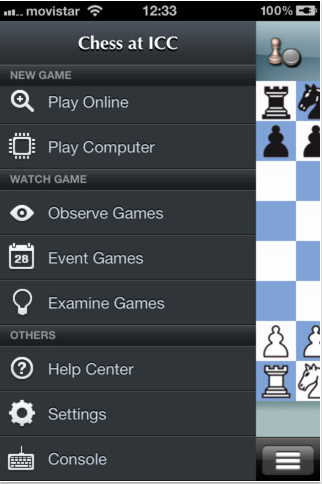
On the iPad, I tend to still use Shredder (see below) to play and study, and Chess With Friends (see below) to play asynchronous games, however I’ve found another app that is better at allowing the importing of .pgn files for analysis, and that is:
t Chess Pro
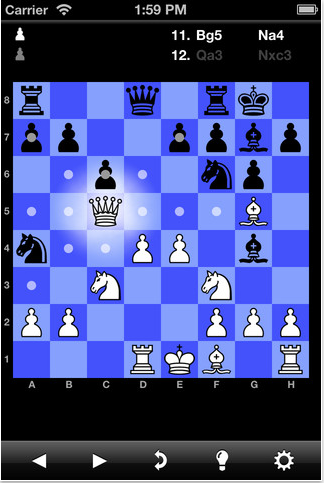
t Chess Pro allows me to grab the emailed games from ICC, drop them into a .pgn file, and upload it to Dropbox. Then I can download that on my iPad and open it in t Chess for analysis.
ORIGINAL POST from 2009:
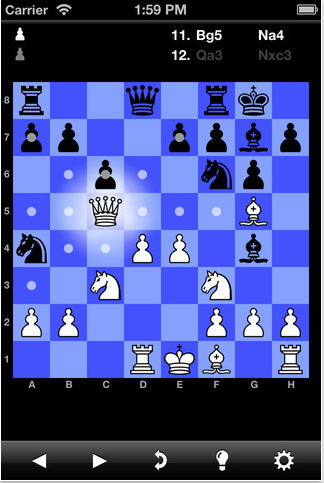
There are a huge number of chess applications for iPhone these days and, as I’m a bit of a chess nut, I’ve been trying to test them all out to find out which are the best chess apps for the iPhone or iPod Touch. There are apps suitable for beginners through to grandmasters as well as apps that will let you play a quiet game by yourself on a plane, through to games that let you play against other iPhone / iPod Touch owners online.
These are the ones I suggest you take a look at. Prices and ratings are from the Australian iTunes store.
Hard Core
If you’re an avid chess player, you probably already know about Fritz and Shredder from their PC apps which have been around for many years and are battle tested against world champions. You might not have heard that they now have iPhone versions.
Fritz

The PC version of Fritz has beaten grand masters from Kasparov to Kramnik. Not enough ratings in the Aussie appstore for an average, but seems to be getting 4 and 5 stars so far, which isn’t surprising.
The Good:
- Suitable for beginners through to very, very, very advanced players
- Claims to have the strongest chess engine on the appstore
- Game analysis
- Allows you to send games to other players via email.
The Bad:
- No online play.
- At $8.99 it’s one of the more expensive chess apps.
Shredder

Another chess app that’s been around on the PC for many years, Shredder claims to be “the most successful chess program ever”. It has an average rating in the iTunes store of 4.5 stars.
The Good:
- Comes with 1000 in-built chess puzzles.
- Game analysis.
- Coach for beginners.
- Huge opening book.
- Send games via email.
The Bad:
- $12.99, it ties for the most expensive chess app for iPhone currently.
- No online play.
Best Free Apps
What options are out there for people who want a serious game but don’t want to fork out the big bucks?
Deep Green Chess Lite

Deep Green Chess Lite provides a solid game of chess for beginner or intermediate players. Average rating 3 stars.
The Good
- The best interface of all of the apps tested, IMHO.
The Bad
- Doesn’t resume or save your game if the app is closed down mid-game. Considering how often I receive calls on my iPhone, this is annoying. Might be better for Touch owners.
iChess

iChess allows for online play on FICS (freechess.org) servers as well as standard play against the AI or human opponents. Average appstore rating 2.5 stars.
The Good
- It has the best of all worlds – online play AND AI play AND it’s free.
- It resumes the game you are playing if you take a call mid-game.
The Bad
- There have been reports of the AI making illegal moves.
- The app has crashed on me a few times.
Best Online Play
Chess With Friends

I’ve been using CWF since it first came out and it’s a terrific asynchronous chess experience. It will set up games for you with random players or allow you to invite friends via email. Average rating of 2.5 stars doesn’t do it justice.
The Good
- It’s free!
- Works over 3G, Edge & WiFi.
- Also allows for local “pass the iPhone” games.
The Bad
- Doesn’t have push notifications for when your opponent makes a move although I imagine with the release of OS3.0 that will be coming soon.
Cyber Chess

If you want real-time online play, then Cyber Chess might be your best option. It connects to both FICS (freechess.org) and ICC (Internet Chess Club) servers. Only one rating on the Aussie appstore, which is for 3 stars. Price $1.19.
The Good
- Allows for real-time chess against human opponents.
- Training mode.
- Support multiple chess variants.
The Bad
- Currently doesn’t support FICS tournaments.
What’s Missing
What I’d really like, but haven’t found yet, is a chess app that let’s me play against another human iPhone to iPhone on the same network. The same way that apps like Bump set up a private network, I’d love to play chess against the person sitting next to me in a cafe without having a real board. I’d love it if we could both whip out our iPhones and start a real-time game against each other. If anyone knows of an app that has that feature, please let me know in the comments section or on Twitter.
by cameron | May 24, 2009 | Australian media, technology
Buy your commemorative t-shirts here!


Clare Werbeloff has punk’d the news. Brilliant. For years the news media have been punking us. It took Clare Werbeloff to turn the tables. She punk’d them. She made up the entire “chk chk boom” story on the spur of the moment. What talent! What creativity! What balls!
Years from now, when studying how the media died, I’m sure journalism professors will point to Clare as one of the defining moments. She perfected the media punk model.
1. Be in the right place at the right time.
2. Find a news crew.
3. Make sure you’re looking hawt – the news doesn’t talk to fuglies.
4. Create a somewhat believable story.
5. Here’s the most important part – Come up with an instant catch phrase that works as a 10 second sound bite!
Together we can speed up the end of the old media by punking them over and over, day and night. They won’t know who to believe. And let’s face it – they won’t care. It’s not like they have cared much about what’s true for the last 20 years anyway. What they care about are the three S’s: sensationalism, scandal, and selling advertising. So this is just taking their model to its natural conclusion.
PUNK THE NEWS!